Conclusion
The less expensive Samsung T7 1TB suits everyday files that comfortably fit its capacity. Choose the SanDisk Extreme 2TB for more storage, or the new Extreme 1TB for faster reads on a confirmed USB 3.2 Gen 2x2 connection.
3 selected products
Buying a portable SSD for its advertised speed before checking your computer's port is the most common mistake. For a drive that fits your home setup, check these three things, in order.
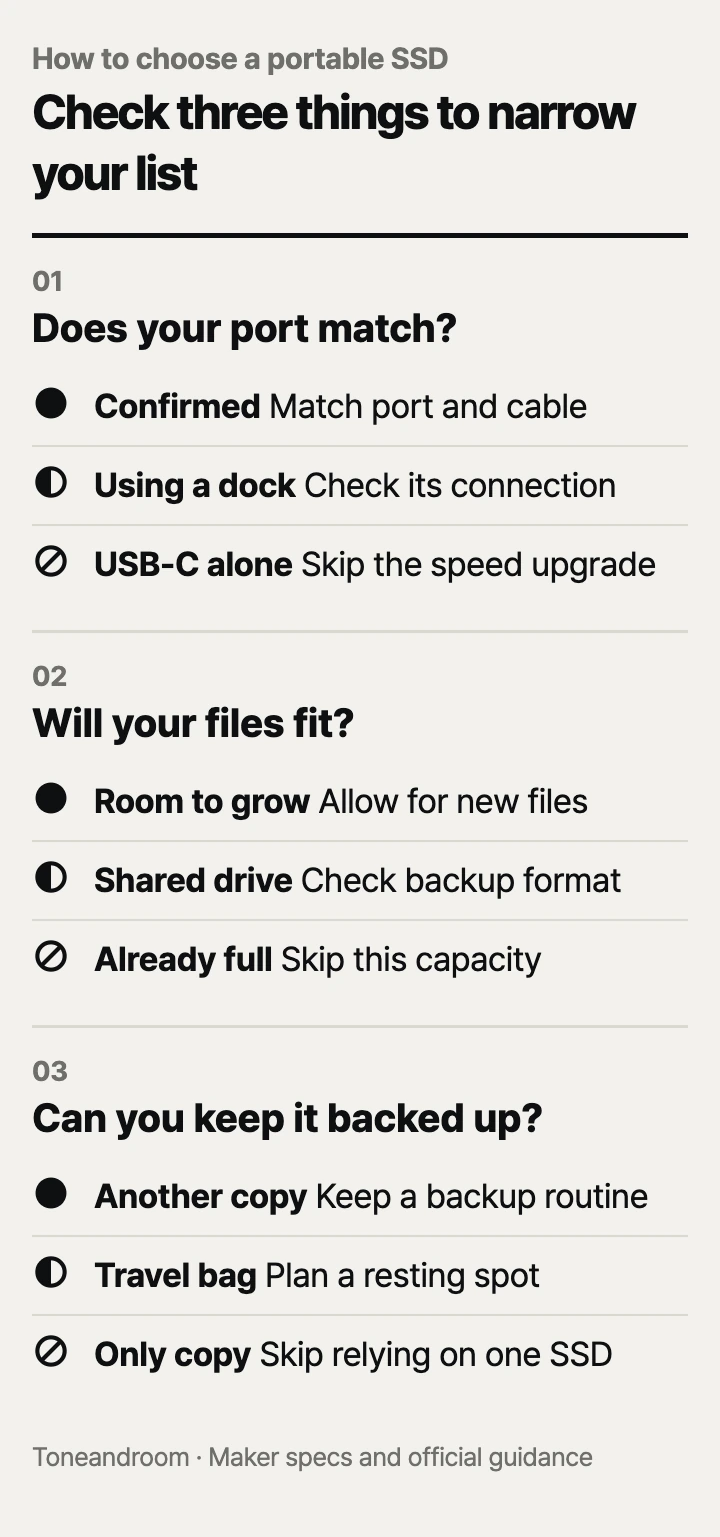
Can your computer use the speed you are paying for?
Match the drive to your computer's USB connection before paying for a faster model. Samsung specifies USB 3.2 Gen 2 for the T7, while SanDisk specifies USB 3.2 Gen 2x2 for the new Extreme. Those similar names describe different connection requirements. Samsung also says the host and cable must support the T7's interface, with UASP enabled, to reach its maximum speeds. Samsung T7 specifications, SanDisk new Extreme data sheet.
A USB-C connector alone does not settle this. Look up the exact laptop or desktop model and the port you plan to use. If the drive will stay plugged into a monitor or dock, check that device's upstream connection and storage port too. Treat an unspecified connection as a reason to pause the speed upgrade.
Swipe sideways to see the full table →
| If your home ... | Our take | What to check |
|---|---|---|
| Has a laptop with a confirmed USB 3.2 Gen 2 port | Worth it | A matching cable and enough storage |
| Has a desktop with a confirmed Gen 2x2 port | Only some models | Whether faster transfers matter to your work |
| Routes storage through a dock with unclear specifications | It depends | The dock's storage connection and upstream link |
| Needs a faster drive only because the box shows a bigger speed number | Skip it | Whether the computer supports that interface |
The new SanDisk Extreme 1TB is the speed-focused choice here. SanDisk lists up to 2,000 MB/s reads and says write speed is lower; an exact maximum write speed is Not listed by the maker in its data sheet. Do not read the headline as a promise for every transfer. SanDisk says performance depends on the host, interface, usage conditions, and other factors. SanDisk new Extreme data sheet.
For a desk used for documents, family photos, and occasional backups, start with the less expensive T7. Paying for the faster SanDisk makes more sense when you regularly move large project folders and have confirmed the connection. This recommendation follows the published requirements; it does not promise a particular transfer time.
- Find the computer's exact model and port specification.
- Check the connection through your usual dock, if any.
- Keep the included cable with the drive so setup stays repeatable.
How much storage will your household actually need?
Choose capacity around the files you plan to keep, including room for new files and backup history. SanDisk offers the older Extreme in the selected 2TB capacity, while the selected new Extreme and Samsung T7 are 1TB products. The exact model matters because SanDisk uses the Extreme name across generations. SanDisk Extreme 2TB on Amazon, SanDisk new Extreme 1TB on Amazon, Samsung T7 1TB on Amazon.
Open the folders you want to move and check their combined size in your computer's file manager. Include photo originals, downloads you still need, video projects, and anything your backup software will retain. A drive sized only for today's folder can become awkward when you want to preserve older versions or bring home a new batch of photos.
 AI-generated illustration for explanation. Not a specific product.
The SanDisk Extreme 2TB is the capacity choice for a household photo library or larger project collection. Its lower rated speed than the new Extreme does not make it the wrong purchase when your main problem is fitting the files. The T7 is the lower-cost starting point when your collection comfortably fits its selected capacity.
If the drive will move between a Windows PC and a Mac, decide on the file system before loading irreplaceable files. Samsung's T7 manual identifies its factory format as exFAT and lists read and write support on both systems. That is useful for sharing files, but your backup application may have its own format requirements. Samsung T7 manual.
Give each drive a clear job: working files, file transfers, or backups. Keeping those jobs clear makes it easier to know which copy is current. Before changing a drive's format, copy anything you need elsewhere and follow your operating system's prompts carefully.
What care routine fits your desk and travel bag?
Choose durability for where the drive goes, and keep a separate copy of important files. SanDisk rates both selected Extreme models IP65 for water and dust resistance, and its guidance says they must be clean and dry before use. That rating does not give you permission to connect a wet drive. SanDisk Extreme data sheet, SanDisk new Extreme data sheet.
For regular trips between your desk and a backpack, the Extreme's carrying loop may be useful. For a drive that lives beside a home computer, cable placement and a consistent backup routine deserve more attention than a rugged exterior. Plan a resting spot where the drive does not dangle from the port or get swept away when you close the laptop.
Samsung's T7 care guidance calls for gentle cleaning with a soft cloth and says to avoid water, chemicals, and detergent. Samsung also instructs users to eject the drive before disconnecting it and to back up important data. Samsung T7 manual.
- Pick a regular place for the drive and its cable.
- Finish transfers and use the computer's eject command before unplugging.
- Confirm that important files also exist somewhere else.
- Check the maker's software guidance before enabling password protection.
A portable SSD used as the only home for family photos is storage, but it leaves you without another copy if that drive becomes unavailable. Make the backup routine easy to repeat, and occasionally open files from the backup to confirm that you can find what you need. Choose the model after deciding how it will fit that routine.
How do the popular picks compare side by side?
Choose the T7 for lower-cost everyday storage, the older Extreme for capacity, and the new Extreme for a compatible faster connection. Samsung and SanDisk publish the specifications below; the Amazon product listings identify the selected capacities and models. Samsung T7 on Amazon, SanDisk Extreme 2TB on Amazon, SanDisk new Extreme 1TB on Amazon.
Swipe sideways to see the full table →
| Model | Capacity | Rated read / write speed | USB interface | Price (Amazon.com, Oct 14, 2026) |
|---|---|---|---|---|
| SanDisk Extreme Portable SSD, SDSSDE61-2T00-G25 | 2TB | Up to 1,050 / 1,000 MB/s | USB 3.2 Gen 2 | about $289.99 on Amazon.com (Oct 14, 2026) |
| SanDisk Extreme Portable SSD, SDSSDE70-1T00-G25 | 1TB | Up to 2,000 MB/s read; exact maximum write speed: Not listed by the maker | USB 3.2 Gen 2x2 | about $249.17 on Amazon.com (Oct 14, 2026) |
| Samsung T7 Portable SSD, Titan Gray, MU-PC1T0T/AM | 1TB | Up to 1,050 / 1,000 MB/s | USB 3.2 Gen 2 | about $228.96 on Amazon.com (Oct 14, 2026) |
Prices are what Amazon.com showed on Oct 14, 2026 and change often.
A closer look at each product
If you need more room for family photos · SanDisk Extreme Portable SSD 2TB, SDSSDE61-2T00-G25
Its 2TB capacity suits a larger collection, with rated reads up to 1,050 MB/s over USB 3.2 Gen 2. Choose it when space matters more than a higher advertised speed.
- 2TB capacity
- Up to 1,050 MB/s reads and 1,000 MB/s writes
- SanDisk lists a carrying loop
- Needs a matching host and cable for full speed
- Costs more than the selected 1TB drives
If you move large projects through a Gen 2x2 port · SanDisk Extreme Portable SSD 1TB, SDSSDE70-1T00-G25
SanDisk rates reads up to 2,000 MB/s over USB 3.2 Gen 2x2. It fits frequent large transfers when the computer supports that connection.
- Up to 2,000 MB/s rated reads
- USB 3.2 Gen 2x2 interface
- Exact maximum write speed: Not listed by the maker
- Selected capacity is 1TB
If you want lower-cost storage for a home desk · Samsung T7 Portable SSD 1TB, Titan Gray, MU-PC1T0T/AM
It has the lowest listed price here, with rated reads up to 1,050 MB/s. Its USB 3.2 Gen 2 interface suits a compatible everyday computer setup.
- Up to 1,050 MB/s reads and 1,000 MB/s writes
- Samsung includes USB-C to USB-C and USB-C to USB-A cables
- Selected capacity is 1TB
- Requires matching port and cable support for maximum speed
In one sentence
Match your USB port, storage needs, and upkeep routine before choosing a portable SSD.
SanDisk Extreme Portable SSD 2TB, SDSSDE61-2T00-G25
View on AmazonSanDisk Extreme Portable SSD 1TB, SDSSDE70-1T00-G25
View on AmazonSamsung T7 Portable SSD 1TB, Titan Gray, MU-PC1T0T/AM
View on AmazonWhat to check
- Port support · Match the host, cable, and dock to the drive interfaceLook up your exact computer and dock models before paying for a faster connection.
- Usable capacity · Allow room for current files and future additionsCheck folder sizes and your backup software requirements before choosing capacity.
- Daily upkeep · Plan storage, disconnecting, and another copyChoose a regular resting spot and a backup routine you can repeat.
- Port and cable support
- Capacity for files and future additions
- An easy backup and disconnect routine
Frequently asked questions
Will a portable SSD reach full speed on any USB-C port?
No. Samsung requires matching host and cable support for the T7, and SanDisk specifies USB 3.2 Gen 2x2 for the new Extreme. Check the computer and any dock before paying for higher speed.
Is 1TB or 2TB better for a home photo library?
Check the size of your photo originals and other files, then allow room for future additions. The selected SanDisk Extreme 2TB offers more room than the selected 1TB models; choose capacity around your collection.
Can I use the Samsung T7 with both a Mac and a Windows PC?
Samsung says the T7 ships in exFAT format, which supports reading and writing on both systems. Check your backup software before reformatting the drive.
Can a portable SSD be my only photo backup?
If the SSD holds the only copy, you have no second copy to recover from if it becomes unavailable. Samsung instructs T7 owners to back up important data. Keep another copy and check that you can open its files.
Sources
- SanDisk Extreme Portable SSD data sheet · Oct 14, 2026
Older Extreme: read and write speeds, USB interface, capacity options, IP65 rating, and clean-and-dry guidance.
- SanDisk new Extreme Portable SSD data sheet · Oct 14, 2026
New Extreme: 1TB option, up to 2,000 MB/s reads, lower write speed, USB 3.2 Gen 2x2, IP65 rating, and clean-and-dry guidance.
- Samsung T7 specifications · Oct 14, 2026
MU-PC1T0T/AM model, 1TB capacity, up to 1,050/1,000 MB/s read/write speeds, USB 3.2 Gen 2, included cables, and host requirements; pricing uses Amazon.com.
- Samsung T7 user manual · Oct 14, 2026
Factory exFAT format, cross-platform read/write support, eject procedure, cleaning instructions, and backup guidance.
Read next
Best Laptop Stands on Amazon.com (2026): Check Setup, Fit, and Desk Space First
Best wireless keyboard on Amazon.com (2026): connection, layout, and upkeep first
Best webcam on Amazon.com (2026): check framing, connection, and call setup first
Best USB-C fast charger on Amazon.com (2026): cable ends, power, and placement first
Other topics

Best Baby Food Maker on Amazon.com (2026): 3 Things to Check First

Best Baby Bathtubs on Amazon.com (2026): Check Fit, Support, and Drying First
Best UV toothbrush sanitizers on Amazon.com (2026): check brush fit, drying, and power first