Conclusion
The cheaper Tapo C100 suits a fixed view of an entry or hallway. Choose the slightly higher-priced Kasa EC70 when moving the view around a room matters, or consider Wyze Window Cam for looking outside through glass.
3 selected products
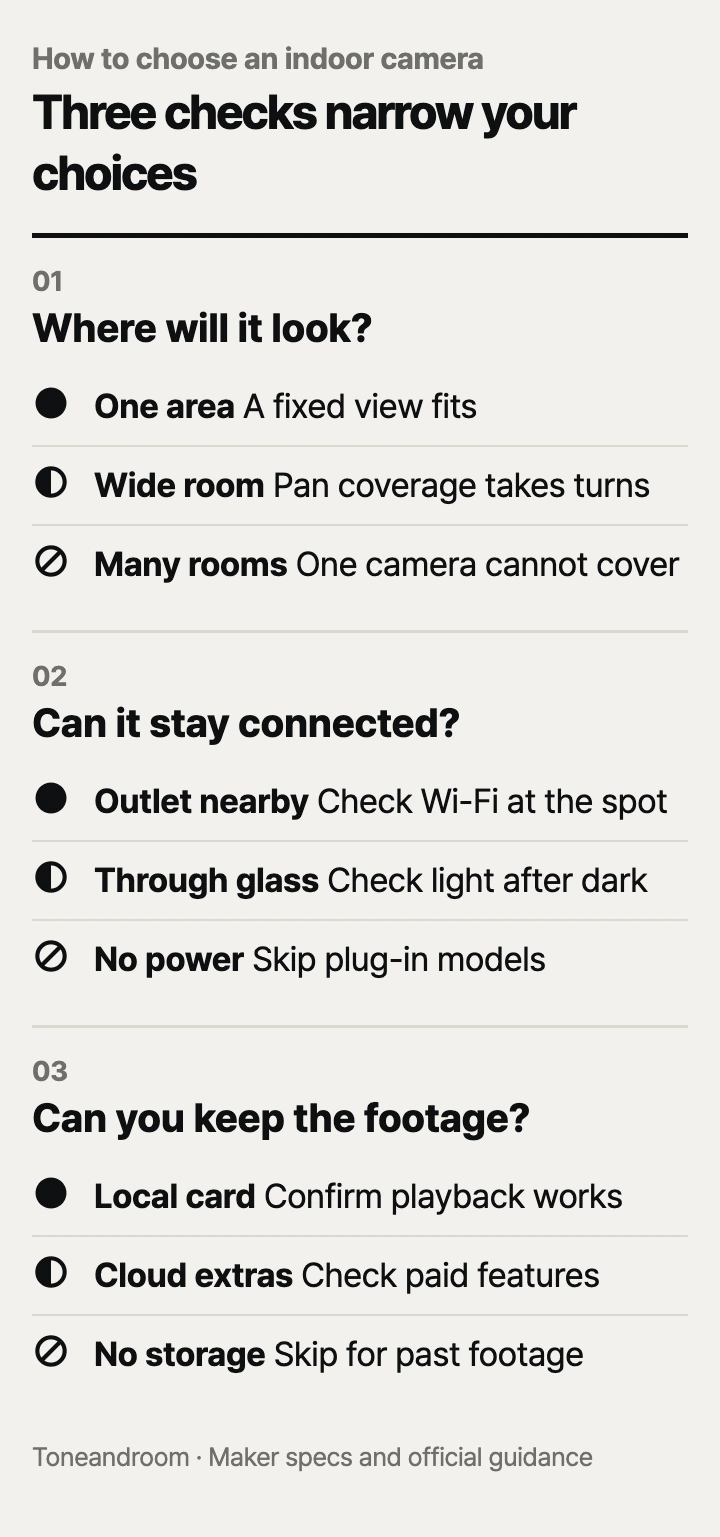
The most common mistake is buying an indoor security camera for its resolution before deciding where it will look and how you will retrieve recordings. Before ordering, check these three things, in order
Will the camera see the area you actually need?
Choose the viewing position first: a fixed doorway view, a wider room, and a view through glass call for different cameras.
Start with the event you want to see. An apartment entry needs a clear view of the door; a living room may need several viewpoints. Sketch the furniture and mark the camera position. Then look for obstructions at that height: a couch back, an open door, or a curtain can matter more than extra pixels.
Swipe sideways to see the full table →
| If your home … | Our take | What to check |
|---|---|---|
| Has one doorway or hallway to watch | Worth it | A fixed camera can frame the whole target area |
| Has an open living room with several activity areas | It depends | Pan and tilt must reach each area without furniture blocking it |
| Needs a view outside through a window | Only some models | A camera designed for glass, outdoor light, and an unobstructed pane |
| Needs simultaneous views of separate rooms | Skip it | One rotating camera cannot watch every room at once |
The Tapo C100 is a fixed 1080p camera. It makes sense for a stable frame, such as an entryway, when you do not need to move the view from your phone.
For a broader room, Kasa lists 360° horizontal and 113° vertical coverage for its EC70, with motion tracking. Those figures describe coverage as the camera turns. They do not mean every direction appears in the same frame. Our take: choose it when moving the view is useful, but keep the most important area in its normal resting view.
For looking outside from indoors, Wyze Window Cam is a complete camera made for window glass. Wyze says it removes infrared lights and the spotlight to reduce reflections. Its color night vision uses available outdoor light. Our take: a streetlight or porch light makes this setup more plausible; an unlit yard needs a different approach. Wyze also advises against mounting behind a screen because it reduces image quality.
Can the camera stay powered and connected in that spot?
Treat outlet access, Wi-Fi compatibility, and nighttime lighting as requirements before choosing extra features.
These are plug-in cameras. “Wireless” in a listing can describe the network connection while the camera still needs a power cord. Trace the actual route from the outlet to the mounting spot, including the distance around furniture. A shelf beside an outlet may be more practical than a ceiling position that requires a long visible cable.
TP-Link, Kasa, and Wyze each list 2.4 GHz Wi-Fi for these models on their official product pages. Check that your router offers that band and that you can connect at the intended location. During setup, follow the maker's app instructions. Once connected, check live view from the camera's final position before committing to a mount.
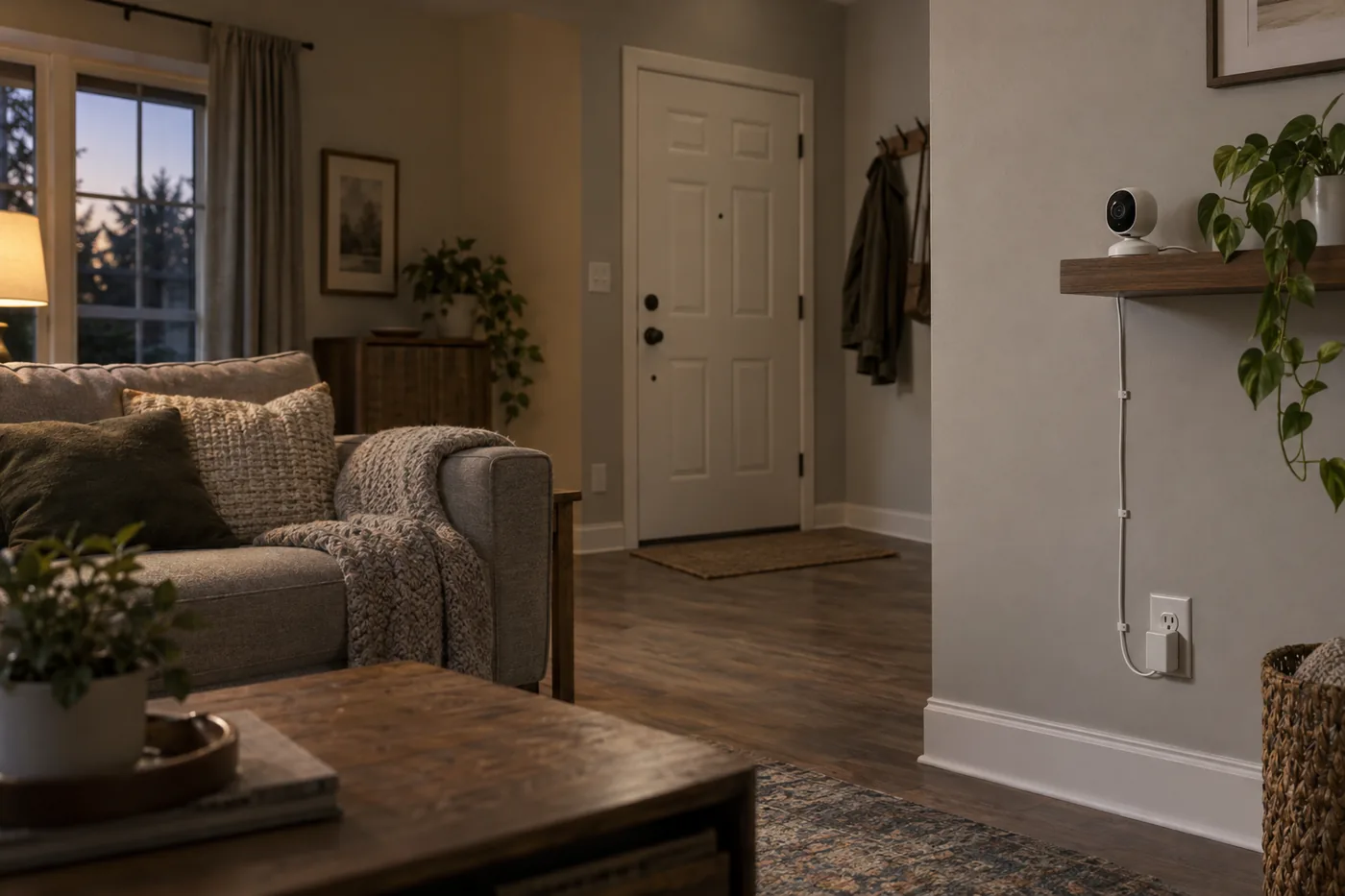 AI-generated illustration for explanation. Not a specific product.
Think about the room after sunset, too. Kasa specifies infrared night vision for the EC70, while Wyze describes the Window Cam's reliance on ambient light. Our take: looking into a dark room and looking through glass at a lit porch are separate jobs. Check the intended scene with the room lights in their usual evening state rather than assuming a daytime view tells the whole story.
If the camera will face a crib, CPSC guidance says to keep cords at least 3 feet from every part of a crib, bassinet, or play yard, keep them out of a child's reach, and never put a monitor inside or on the edge of a crib. Plan that route before choosing a nursery shelf or wall position.
Before mounting:
- Confirm the outlet-to-camera route with a tape measure.
- Check whether a door or curtain will block the lens.
- Decide which private areas should stay outside the frame.
- Make sure household members know where the camera looks and when it records.
Will recording and daily upkeep fit your routine?
Choose a recording method you can maintain and retrieve from, then check which alerts require a subscription.
A live view answers what is happening now. Recording answers what happened while you were away. Decide whether you need a continuous timeline, event clips, or occasional live checks before comparing cloud features. For footage you expect to keep, work through the download process early rather than waiting until a clip matters.
TP-Link lists local microSD recording and optional Tapo Care cloud storage for the C100. Its current US specifications allow up to 512 GB, while the Amazon listing includes a 128 GB capacity entry. Confirm the hardware version and supported card limit before buying a card.
Kasa specifies microSD storage up to 256 GB for the EC70 and says it overwrites the oldest files when full. The EC70 Amazon listing describes local recording without a monthly fee and optional Kasa Care cloud storage. Our take: plan to save important clips elsewhere rather than treating a full card as a permanent archive.
The Wyze Window Cam Amazon listing describes continuous local recording with a separately purchased microSD card up to 512 GB. It also distinguishes basic motion and sound alerts from subscription features such as recognition of people, pets, vehicles, and packages. Compare the feature you want with the plan requirement, not just the phrase “no subscription.”
A larger card capacity does not establish a guaranteed number of recording days. Recording duration at your chosen settings: Not listed by the maker for a directly comparable setup across these cameras. Check the recording settings and remaining history in the app.
Keep the routine manageable:
- Include a compatible microSD card in the purchase budget.
- Confirm recordings play back and learn how to export a clip.
- Check the lens and viewing area when dust or furniture changes the image.
- Review notification settings if everyday movement produces unwanted alerts.
How do the popular picks compare side by side?
Choose Tapo for a fixed indoor view, Kasa for a view you can rotate, and Wyze for watching outside through glass.
Amazon's “bought in past month” labels on Oct 14, 2026 showed 10K+ for the C100, 10K+ for the EC70, and 8K+ for the Window Cam. Those labels indicate popularity, not recording quality or suitability for your layout. TP-Link, Kasa, and Wyze publish the specifications below; the C100 card limit needs confirmation for the hardware version being sold.
Swipe sideways to see the full table →
| Model | Video | Viewing setup | Local recording | Price (Amazon.com, Oct 14, 2026) | Buy |
|---|---|---|---|---|---|
| Tapo C100 | 1080p | Fixed indoor view | microSD; confirm hardware limit | about $24.99 on Amazon.com (Oct 14, 2026) | View on Amazon |
| Kasa EC70 | 1080p | 360° horizontal / 113° vertical coverage | microSD up to 256 GB | about $25.99 on Amazon.com (Oct 14, 2026) | View on Amazon |
| Wyze Window Cam | 1080p | Fixed view through window glass | microSD up to 512 GB | Price varies; check Amazon | View on Amazon |
Prices are what Amazon.com showed on Oct 14, 2026 and change often.
A closer look at each product
If you want one fixed indoor view · Tapo C100
Its fixed 1080p view fits an entryway or hallway. Local microSD recording and optional Tapo Care offer different storage choices.
- 1080p video
- Local microSD recording
- Two-way audio
- No motorized pan or tilt
- Confirm the hardware version and card capacity limit
If you need to move the view around a room · Kasa EC70
Pan and tilt provide broader coverage as the camera turns. Local recording supports a continuous timeline without a cloud plan.
- 1080p video
- Motion tracking
- microSD support up to 256 GB
- Rotating coverage is not simultaneous coverage
- Requires 2.4 GHz Wi-Fi
If you want to look outside through glass · Wyze Window Cam
Wyze designs this complete camera for mounting behind window glass. Its glare-reducing design suits an outdoor view with ambient light.
- 1080p video
- Window mounting system
- Continuous local microSD recording
- No infrared lights or spotlight
- Wyze advises against mounting behind a window screen
In one sentence
Choose an indoor security camera by placement, power and Wi-Fi, then recording and upkeep.
Tapo C100
View on AmazonKasa EC70
View on AmazonWyze Window Cam
View on AmazonWhat to check
- Placement · Fixed area, wider room, or through glassMark the target area and camera position, then check for furniture, doors, and curtains blocking the view.
- Power and Wi-Fi · Outlet route, compatible network, and nighttime sceneMeasure the cord route and check live view at the intended mounting location before committing to it.
- Recording and upkeep · Card compatibility, paid features, and clip retrievalConfirm the card limit, choose a recording mode, and learn how to save a clip before relying on the timeline.
- Placement and obstructions
- Outlet access and compatible Wi-Fi
- Local recording, subscriptions, and clip retrieval
Frequently asked questions
Can an indoor security camera record without a subscription?
These models offer local microSD recording, with cards purchased separately. Check the model and hardware version for card compatibility, and confirm which cloud or recognition features need a paid plan.
Will these cameras work with a 5 GHz-only Wi-Fi network?
TP-Link, Kasa, and Wyze specify 2.4 GHz Wi-Fi for these cameras. Confirm your router provides that band before ordering.
Can an indoor security camera see through a window at night?
Wyze says Window Cam removes infrared lights and its spotlight to reduce reflections through glass. It relies on ambient outdoor light, and Wyze advises against placing it behind a screen.
How far should a security camera cord be from a crib?
CPSC says cords should be at least 3 feet from every part of a crib, bassinet, or play yard and out of a child's reach. CPSC also says never to position a monitor inside or on the edge of a crib.
Sources
- TP-Link Tapo C100 US specifications · Oct 14, 2026
Current C100 specifications: 1080p, 2.4 GHz Wi-Fi, adapter power, and up to 512 GB microSD storage; hardware version matters.
- Kasa EC70 product specifications · Oct 14, 2026
360° horizontal and 113° vertical coverage, infrared night vision, motion tracking, and overwrite behavior.
- Wyze Window Cam specifications and mounting guidance · Oct 14, 2026
1080p video, 2.4 GHz Wi-Fi, no infrared lights or spotlight, ambient-light night vision, and screen restrictions.
- CPSC baby monitor cord safety guidance · Oct 14, 2026
Keep cords at least 3 feet from sleep spaces and out of reach; never place a monitor inside or on the edge of a crib.
Read next
Best smart plugs on Amazon.com (2026): Check apps, appliance limits, and outlet fit first
Best dash cam on Amazon.com (2026): Check coverage, parking power, and file access first
Best e-readers on Amazon.com (2026): check book access, screen and light, and charging first
Best Stylus Pens on Amazon.com (2026): Check Tablet Fit, Writing Features, and Charging
Other topics

Best Baby Food Storage Containers on Amazon.com (2026): Portion Size, Shelf Fit, and Cleanup
Best Closet Moisture Absorbers on Amazon.com (2026): Moisture Load, Placement, and Upkeep
Best knife sharpener on Amazon.com (2026): Check blade match, workspace, and upkeep first