

The call window stalls on an aging laptop while a spreadsheet disappears behind it on an apartment desk.
 A crowded desk can hide two different problems: a struggling computer and too little screen space.
I'd start with the Apple MacBook Air 13-inch, M5, 16GB memory, 512GB SSD if the computer itself needs replacing. With the ASUS ProArt Display PA279CRV, the checked hardware total is $1,648 before tax and shipping; a dock is not automatically part of that bill.
But is the laptop actually slowing your work, or are you simply running out of room for documents? That distinction matters more than a sale banner, because a monitor changes the workspace without fixing a computer or an unreliable internet connection.
How we chose
Checked Apple US prices and specifications, ASUS monitor offer data and specifications, and OWC dock pricing and connections. The three criteria are workload fit, full hardware cost, and accessory overlap; the calculations exclude tax, checkout shipping, and optional extras.
Toneandroom picks
Best Apple laptop desk buys for a home office: Top 3
The aging computer needs replacing and the base configuration meets the job's requirements
Apple MacBook Air 13-inch, M5, 16GB memory, 512GB SSD
Apple US starting price $1,299 before tax and any checkout shipping; checked 2026-11-24. Price varies; check Amazon.
It is the lower-cost quoted laptop and supports the specified single 4K display without a separate dock.
- Memory
- 16GB
- SSD
- 512GB
- Ports
- 2 × Thunderbolt 4
- Your job fits the base configuration
- A single 4K screen meets your needs
- Check current storage use first
- Confirm required apps support macOS
Local storage, HDMI, or camera-card transfers justify the extra cost
Apple MacBook Pro 14-inch, M6, 16GB memory, 1TB SSD
Apple US starting price $1,999 before tax and any checkout shipping; checked 2026-11-24. Price varies; check Amazon.
The larger quoted SSD and built-in connections can justify the $700 premium when they meet a concrete work requirement.
- Memory
- 16GB
- SSD
- 1TB
- Ports
- HDMI + SDXC
- Your files need the quoted 1TB SSD
- HDMI or SDXC is part of the job
- Costs $700 more than the quoted Air
- Not a storage-matched comparison
A capable computer needs more screen space and a direct USB-C desk connection
ASUS ProArt Display PA279CRV
ASUS US store offer $349, regular price $429, before tax and any checkout shipping; checked 2026-11-24. Price varies; check Amazon.
USB-C video, charging, and a hub let the monitor cover part of the accessory job while adding a larger workspace.
- Size
- 27 in
- Resolution
- 3840 × 2160
- Refresh
- 60Hz max
- USB-C PD
- Up to 96W
- Documents need a larger workspace
- USB-C can replace a separate dock
- Maximum refresh rate is 60Hz
- Check desk fit and US box contents
What we considered
Workload fit
Which part of the desk is holding up the work?
The quoted Air and Pro both have 16GB memory but different SSD capacities. Match apps, files, and employer requirements before assigning extra budget to the Pro.
Complete cost
What does the usable setup cost before extras?
The checked Air-and-display basket is $1,648, compared with $2,348 for the Pro and the same screen. Both exclude tax and checkout shipping, so compare the final basket rather than monthly payment advertising.
Accessory overlap
Does a separate dock add a connection you need?
ASUS lists USB-C video, a hub, and up to 96W charging on the monitor. Those functions make a direct connection practical, leaving the $199.99 dock for an actual expansion need.
Part 1Apple laptop prices: start with the complete bill
Apple's US buying pages list the quoted Air from $1,299 and the Apple MacBook Pro 14-inch, M6, 16GB memory, 1TB SSD from $1,999. Both have 16GB memory, but the Pro's 1TB storage differs from the Air's 512GB, so the $700 gap is not a storage-matched chip comparison.
ASUS's US store currently lists the PA279CRV at $349 against a $429 regular price. That is an $80 displayed reduction, calculated from those figures, rather than evidence of the lowest price it has ever reached.
The optional OWC 11-Port Thunderbolt Dock TB4DOCK is $199.99 after instant rebates at MacSales.com. Its $229.99 comparison price implies a $30 reduction, but the useful question is whether your desk needs its extra connections.
All these US dollar prices were checked November 24, 2026. The baskets exclude sales tax, any checkout shipping, protection plans, and software, with no trade-in or financing adjustment.
Swipe sideways to see the full table →
| Desk basket | Hardware calculation | Subtotal |
|---|---|---|
| Air and ASUS monitor | $1,299 + $349 | $1,648 |
| Air, monitor, OWC dock | $1,299 + $349 + $199.99 | $1,847.99 |
| Pro and ASUS monitor | $1,999 + $349 | $2,348 |
| Pro, monitor, OWC dock | $1,999 + $349 + $199.99 | $2,547.99 |
The amount to compare at checkout is the hardware subtotal plus your actual tax, shipping, and deliberately chosen extras.
Part 2Air or Pro: name the job before paying more
For documents, messaging, and calls, the Air is my lower-cost starting point, provided your apps and employer allow macOS. Its quoted 16GB memory and 512GB SSD need to fit your workload and files; a lower starting price stops helping if you immediately need a different configuration.
Apple specifies two Thunderbolt 4 ports with native DisplayPort support on this Air. That means its published display capability covers the single 4K, 60Hz monitor here, so buying the Pro solely to connect this screen would be unnecessary.
The quoted Pro instead pairs 16GB memory with a 1TB SSD and includes HDMI and an SDXC card slot. Those additions are useful when local files, presentation cables, or camera cards are part of the job; they are not proof that a stalled video call needs a more expensive processor.
I'd spend the extra $700 only for an identified requirement. Because these are differently equipped machines, that requirement might be storage or ports rather than computing speed, and the budget should say which.
Apple's specifications list a power adapter and MagSafe cable in the box for both quoted laptops. So a separate charger should not quietly enter the cart unless you actually need another charging location.
Before replacing either machine, compare your current storage use with the quoted SSD and check the apps your employer requires. If the computer works normally away from calls, investigating the connection first may leave the laptop budget untouched.
Part 3Let the 4K monitor do its share
The ASUS ProArt Display PA279CRV is a 27-inch, 3840 × 2160 display with a 60Hz maximum refresh rate, according to ASUS. That gives document-heavy work a larger screen to arrange windows on, but it is not a high-refresh gaming purchase.
ASUS also lists USB-C video, a USB hub, and up to 96W USB-C Power Delivery. With a suitable USB-C cable, that means this screen can supply the display connection and laptop charging without a separate dock.
The maker's accessories list includes a USB-C cable, with contents varying by region. So confirm the US package before paying for a duplicate, and measure the monitor's intended position rather than assuming an apartment desk will accommodate it.
The optional OWC dock offers Ethernet, more USB connections, and a card reader. Its value begins with a missing port you can name, not with the assumption that every laptop-and-monitor setup needs a dock.
OWC specifies up to 96W host charging as well. But that and the monitor's 96W are alternative power paths, not figures to add together, so choose which device will connect to and charge the laptop.
A simple layout connects the monitor directly to the Air and leaves its other Thunderbolt port available. If your accessories fit that arrangement, postponing the dock keeps $199.99 out of today's cart without removing the screen.
Count the connections you need after accounting for the monitor's own hub, not before.
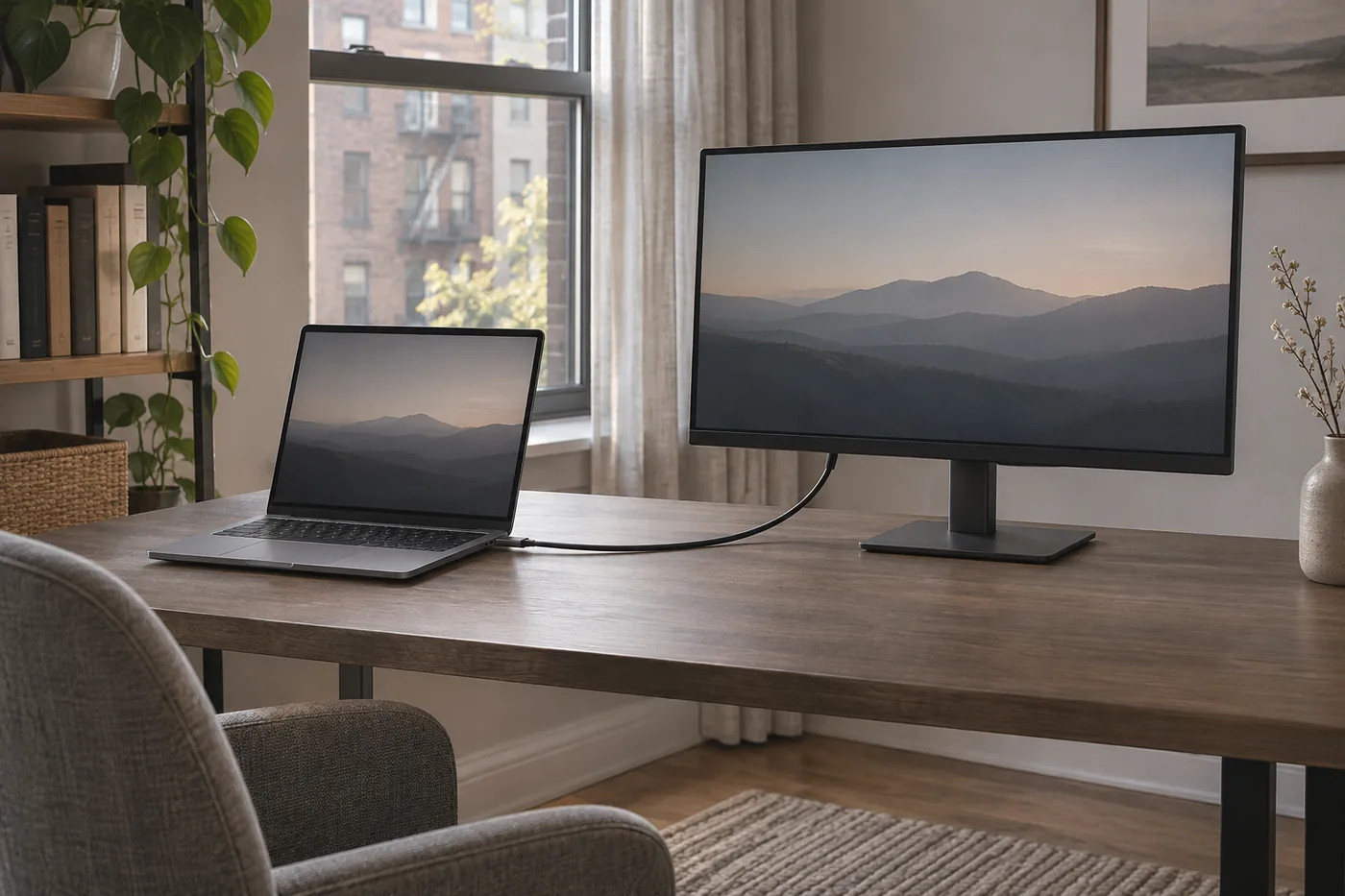 A direct laptop-to-monitor cable leaves the desk without a separate dock to place.
Part 4Black Friday: buy the fix, not the bundle
These are checked store prices, not a confirmed Black Friday package or a forecast of the sale floor. Because an exact Amazon.com offer was not verified, the Amazon price remains: Price varies; check Amazon.
When another offer appears, compare the exact chip, memory, storage, seller, included accessories, and return terms. Then compare checkout totals, because a headline laptop discount can disappear when the basket contains accessories you did not need.
If the existing laptop is capable but documents are cramped, the monitor can come first after you confirm the older computer's video compatibility. But if the machine itself remains the obstacle, a larger display is not a substitute for replacing it.
 Separate the computer, display, and optional connections before committing to the full basket.
Method: Checked Apple US buying pages and specifications, ASUS US offer data and specifications, and OWC pricing and connections. Selection follows workload fit, complete hardware cost, and overlapping accessories; totals are arithmetic, not performance measurements. Last checked November 24, 2026.
My recommendation is the appropriately configured Air first when the computer needs replacing, the ASUS screen when desk space is the problem, and no dock until a missing connection earns its place.
In one sentence
The quoted Air and ASUS 4K monitor total $1,648 before tax and shipping at US store prices checked November 24, 2026.
Apple MacBook Air 13-inch, M5, 16GB memory, 512GB SSD
Apple MacBook Pro 14-inch, M6, 16GB memory, 1TB SSD
ASUS ProArt Display PA279CRV
Frequently asked questions
How much does a MacBook Air and 4K monitor cost together?
At US store prices checked November 24, 2026, the quoted $1,299 Air plus the $349 ASUS PA279CRV totals $1,648 before tax and any checkout shipping. Adding the $199.99 OWC dock brings the hardware subtotal to $1,847.99.
Does this MacBook Air need a dock for the ASUS PA279CRV?
No separate dock is required for this single display. Apple specifies DisplayPort output on the Air's Thunderbolt ports, and ASUS lists USB-C video and up to 96W charging; use a suitable video-capable USB-C cable and confirm US box contents.
What does the quoted MacBook Pro add for $700?
The quoted Pro has a 1TB SSD rather than the Air's 512GB, plus HDMI and an SDXC slot. Both quoted configurations have 16GB memory, so the price gap is not a storage-matched processor comparison.
Are these confirmed Black Friday or Amazon sale prices?
No specific Black Friday package or Amazon offer was verified. These are US manufacturer-store references checked November 24, 2026; the ASUS page shows $349 against $429 regular pricing, but that does not establish a historical low. Price varies; check Amazon.
Sources
- Apple MacBook Air 13-inch, M5, 16GB memory, 512GB SSD · 2026-11-24
US buying-page offer data starts at $1,299; entry configuration identifies the 13-inch M5 model with 16GB memory and 512GB SSD.
- Apple MacBook Pro 14-inch, M6, 16GB memory, 1TB SSD · 2026-11-24
US buying-page offer data starts at $1,999; entry 14-inch M6 configuration has 16GB memory and 1TB SSD. The calculated difference from the quoted Air is $700.
- Apple MacBook Air technical specifications · 2026-11-24
16GB base memory, 512GB base SSD, two Thunderbolt 4 ports with DisplayPort, and external-display support including 4K at 144Hz. Box contents include a power adapter and MagSafe cable.
- Apple MacBook Pro technical specifications · 2026-11-24
14-inch M6 model lists 16GB memory, 1TB SSD, three Thunderbolt 4 ports, HDMI, SDXC, and external-display support including 4K at 165Hz. Box lists a 70W adapter and MagSafe cable.
- ASUS ProArt Display PA279CRV · 2026-11-24
US product offer data shows $349; regular-price data shows $429, a calculated $80 reduction. Specifications list 27 inches, 3840 × 2160, 60Hz maximum, USB hub, up to 96W USB-C Power Delivery, and a region-dependent USB-C cable accessory.
- OWC MacSales.com TB4DOCK price · 2026-11-24
Offer data lists $199.99 after instant rebates and $229.99 comparison price, a calculated $30 difference. Adding $199.99 to the $1,648 Air basket gives $1,847.99; the $2,348 Pro basket becomes $2,547.99.
- OWC 11-Port Thunderbolt Dock connections · 2026-11-24
11-port dock offers three downstream Thunderbolt 4 ports, four USB ports, Ethernet, audio, card reader, and up to 96W host charging.







